Your customers are on Reddit right now, describing their exact problem in public. They're asking which tool to switch to, complaining about their current vendor, or asking for recommendations by name. GenLead finds those posts automatically and scores them by buying intent so you can focus on the conversations worth having.
This guide walks you through everything: from the two-minute setup to the AI training feedback loop that makes GenLead dramatically better over time. If you just signed up, start here. If you've been using it for a while and the results feel mediocre, there's a good chance one of the sections below explains why.
Getting started: the two-minute onboarding
The onboarding is designed to get you from zero to first leads in under five minutes. You don't need to know anything about subreddits or keywords ahead of time. The AI figures out a starting configuration from a plain-English description of your product.
When you first log in, you have two options: describe what you sell in plain English, or just paste your website URL and let the AI figure it out. The URL option is the fastest path — GenLead reads your site, understands what you offer, and builds your entire configuration from that. One field, one click.
If you go the description route, don't overthink it. Write it the way you'd explain it to someone at a coffee shop: "We help small e-commerce stores recover abandoned carts through SMS and email." That's enough.
Either way, GenLead's AI does three things automatically:
- Suggests a list of subreddits where your potential customers are likely posting
- Generates a set of keywords to watch for in those communities
- Drafts your first outreach message template and writes an initial scoring criteria description
Before you commit, you get a live preview showing real matching Reddit posts from the last few days. This is worth looking at carefully. If the previewed posts look relevant, you're in good shape. If they're completely off-base, adjust your description and regenerate. It takes about 30 seconds.
Once you click "Go live," GenLead queues your subreddits for a priority fetch. Leads typically start appearing within a few minutes.
Pro tip: The AI's initial suggestions are a good starting point, not the final answer. Spend the first week looking at what's coming in, then tune your subreddits and keywords based on what's actually matching.
Choosing the right subreddits
You can monitor up to 30 subreddits on a paid plan, or 5 on the free trial. The number isn't the constraint. The quality of your selection is.
The config screen shows you each subreddit's subscriber count and estimated posts per day. These numbers help you quickly spot duds -- a subreddit with 800 members and 2 posts per day is probably too slow to be worth a slot.
The bigger mistake isn't picking low-activity subreddits. It's picking the obvious broad ones and ignoring the niche ones where actual buyers hang out.
r/startups has 1.2 million members. r/microsaas has about 30,000. The posts in r/microsaas are almost all from people running small software businesses who are actively buying tools. The signal-to-noise ratio is completely different. If you sell something for indie software founders, r/microsaas will give you better leads per matched post than r/startups by a wide margin.
Same pattern holds across categories. r/solopreneur, r/smallbusiness, r/consulting, r/devops, r/freelance -- these niche communities tend to have more buying-intent conversations because the community is tightly scoped. People post there because the community understands their specific context.
Pro tip: Use the subreddit explorer graph (the Explore tab) to discover related communities you might not have considered. It maps out which subreddits overlap in membership, which often reveals non-obvious places your ICP hangs out.
The autocomplete in the config screen helps you find subreddits quickly. Type a topic and it surfaces options with their subscriber counts. Add a subreddit, check its posts per day in the UI, and remove it if it's too slow or off-topic. Iterate.
Keyword strategy: short beats specific
Keywords are how GenLead casts its net. You can use up to 50 on a paid plan, or 10 on a trial. The common mistake is using keywords that are too long.
People on Reddit don't write in complete polished sentences. They write the way they talk. A post asking about CRM tools might say "what CRM are you guys using" or "tired of Salesforce, any good alternatives" -- not "best CRM software for small business teams."
If your keyword is "best CRM for small business," it will barely match anything. If your keyword is "CRM," it matches every conversation where that abbreviation appears. The AI handles the context. Your job is to cast a wide net with the right terms, not to pre-filter with long phrases.
| Too specific (rarely matches) | Better (matches more posts) |
|---|---|
| "best CRM for small business" | "CRM" |
| "abandoned cart email automation" | "abandoned cart", "SMS marketing" |
| "project management software alternative" | "project management", "Asana alternative" |
| "payroll software for remote teams" | "payroll", "Gusto", "contractor payments" |
| "customer support ticketing system" | "help desk", "support tickets", "Zendesk" |
Notice the "Zendesk" and "Gusto" entries above. Competitor names are some of the best keywords you can add. People asking "we're switching from Zendesk, what do you recommend?" are telling you they have a budget, they're actively evaluating, and they want someone to talk them into something. That's a warm lead.
Also useful: pain-point keywords that don't mention your category at all. If you sell a tool that helps teams handle on-call rotations, "on-call burnout" or "pagerduty bills" might catch relevant posts that "on-call management software" would miss entirely.
Pro tip: Start with 15 to 20 keywords and watch what comes in for a week. You'll quickly spot patterns in what's matching -- add keywords that look like the good matches, remove ones that keep bringing in irrelevant posts.
Understanding AI scoring
Every lead GenLead surfaces gets scored from 1 to 10. The score reflects three things: how clearly the person has a problem your product solves, how much buying intent they're showing, and how engaged the post is (comments, upvotes, recency).
Scores 7 and above show up in your Inbox -- these are the posts where someone is actively looking for a solution and your product is a plausible fit. Scores 4 to 6 land in Low Score -- worth a look, but the signal is weaker. Below 4, the AI filtered it out entirely.
The scoring criteria description you write during setup is what shapes how the AI evaluates leads. This is easy to get wrong.
A vague criteria description like "people interested in fitness" tells the AI almost nothing. It doesn't know whether to score a casual runner the same as someone training for their first marathon and frustrated with their $600 Garmin watch. "Runners frustrated with expensive GPS watches who want accurate tracking at a lower price point" gives the AI something to work with. It can now distinguish between someone asking general questions about running shoes and someone specifically complaining about Garmin's price hike.
If the leads coming in feel too broad or too narrow, the scoring criteria description is usually the first thing to fix. You can update it any time from the config screen.
Training the AI: your biggest lever
This is the feature that separates GenLead from every other reddit monitoring and lead generation tool on the market. The AI learns from your corrections.
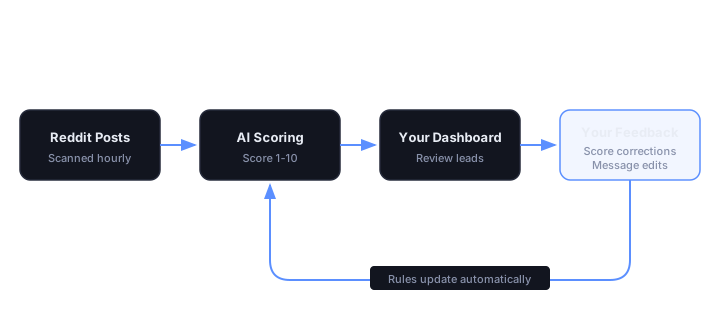
Every time you disagree with a score, you can click it and adjust it. When you do, that correction gets stored. After you've made around 20 corrections, GenLead distills those into an updated set of scoring rules that the AI uses going forward. The next batch of leads will be scored with those rules baked in.
In practice this means the tool gets noticeably better after your first week of use. You're teaching it what "good" looks like for your specific product and ICP.
Same thing happens with outreach messages. Every time you edit a drafted message before sending it, the AI picks up on your voice and tone. Change "I noticed that you mentioned..." to "I saw your post about..." and the AI learns to write that way next time. After 10 or 15 edits, the drafted messages start sounding like you wrote them.
Marking leads as "Not Relevant" is also training. It teaches the AI what to filter out -- the kinds of posts that match your keywords but aren't actually a fit. This tightens up your lead scoring AI over time.
Pro tip: Don't just click "Not Relevant" and move on. When you correct a score, be consistent. If a score-6 post is actually a 9 in your view, move it to 9, not 7. Aggressive corrections train the model faster than conservative ones.
Most lead generation tools give you a static filter you configure once and forget. GenLead gets better the more you use it. That's not a marketing line. The feedback loop is the whole point.
Outreach that doesn't get you banned
The messages GenLead drafts are intentionally not salesy. Each one references the person's actual Reddit post -- the specific thing they said, not a generic opener. This matters a lot on Reddit.
Reddit users are allergic to obvious cold outreach. If your message starts with "I noticed that you mentioned..." or uses em-dashes or sounds like it came from a marketing email, you'll get ignored or reported. The AI is tuned to avoid those patterns.
The default template and subject line you set in config are the baseline. You can write these in your own voice from the start. Something like:
"Hey, saw your post about [problem]. We built [product] specifically for that. Happy to give you a quick look if you're still evaluating options."
Short, direct, no hype. The AI personalizes from there based on what the person actually wrote.
When you're ready to send, one click opens a Reddit DM with the message pre-filled. You review it, adjust anything you want, and hit send. You're never sending anything you haven't looked at.
Pro tip: Edit your first 10 to 15 outreach drafts even when they look fine. Small changes add up to the AI learning your style. After a month, the drafts require almost no edits.
Notifications: Slack and email
Timing matters on Reddit. A post that's 6 hours old is better than one that's 2 days old. Getting notified fast means you can respond while the conversation is still active.
Slack integration sends you an alert the moment a new lead is found. The notification includes the lead score, a preview of the matched post, and action buttons right inside Slack -- you can open the lead or mark it not relevant without opening the dashboard.
Email notifications give you more flexibility. You can choose realtime alerts, a daily digest, or a weekly summary. If you check Reddit leads as part of a daily routine, the morning digest is probably the right choice. If you want to catch high-intent leads as fast as possible, realtime with a Slack integration is better.
Both notification types include the lead score so you can triage in the notification itself, not after you open the dashboard.
The SEO comment tool
This one is easy to overlook because it lives in the Threads tab, not the main leads feed. It's worth knowing about.
When someone searches Google for something like "best tool for X" or "alternative to Y," Reddit threads often rank in the top 3 results. These threads can send thousands of visitors over months or years. If your product is mentioned helpfully in one of those threads, you're getting free visibility from a page people are actively finding.
The SEO comment tool works like this: you enter a Google search phrase related to your product, GenLead finds the Reddit threads that currently rank for that phrase, and then drafts a helpful comment that mentions your product. You review the draft, adjust the tone, and post it.
The key word is "helpful." The best comments in these threads answer the question honestly and mention your product as one option, not as the only answer. If you make it feel like an ad, it'll get downvoted into oblivion. If you write something useful that happens to mention what you built, it sticks.
Pro tip: Focus the SEO comment tool on threads that rank for high-commercial-intent searches -- "best X for Y" and "alternative to [Competitor]" style queries. Those are the pages where readers are trying to make a decision.
Your daily workflow: the 5-minute routine
Once GenLead is configured and running, the daily routine takes about five minutes. Here's how to structure it.
Start in your Inbox. These are the 7+ scored leads from the last 24 hours. Read through them quickly. For each one, decide: worth reaching out, or not relevant? If the post is relevant, click through to see the drafted message. Edit it if needed, then open the Reddit DM. If it's not a fit, mark it Not Relevant -- you're training the AI at the same time.
After Inbox, check Low Score briefly. Occasionally a post that scored a 5 is actually a great lead that the AI misjudged. When you find one, correct the score. Those corrections matter.
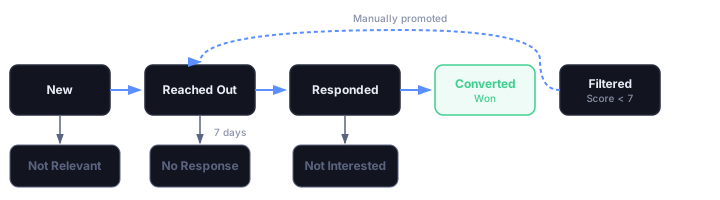
Check the Outreach tab to see if anyone has responded to a message you sent. Leads you've contacted move through the state machine: Reached Out, then Responded, then Converted or Closed. Keeping the pipeline stages current is useful if you're tracking conversion rates.
That's it. The whole thing takes five minutes on most days. The AI is running in the background, scoring new posts every hour across all your subreddits. You just need to process what it surfaces.
Pro tip: Checking leads daily beats checking weekly, even for a small inbox. Reddit post engagement falls off fast. A day-old post is still in the conversation. A week-old post is buried.
Getting the most out of GenLead over time
The first two weeks are the most important. That's when you're training the AI and dialing in your subreddit and keyword configuration. Spend a few extra minutes reviewing leads in that window -- more corrections, more message edits. The AI learns faster.
After the first month, most users say they're spending less time on Reddit lead generation than before GenLead, while finding more leads. That's the goal. The AI handles the scanning and the first-pass scoring. You handle the outreach and the judgment calls. It's a reasonable division of labor.
GenLead is $5 a month to start. If you get one customer from it in the first month, it pays for itself several times over. Start your free trial here -- you'll have leads coming in before the end of the day. If you're new to Reddit lead generation, our practical guide for B2B covers the fundamentals of finding and engaging with buying-intent posts.